
Finding a job is not just about sending applications. It is also about staying organized.
When someone applies to many companies, it becomes difficult to remember where they applied, which company replied, which interview is coming soon, what salary was offered, and which application was rejected or accepted.
To solve this problem, I created a complete web-based project called Smart Job Application Tracker.
This project is built using PHP, MySQL, HTML, CSS, and JavaScript. It allows users to manage their job applications from one clean dashboard.
The project is developed under my personal brand Ibrahimx.
Developer: Md Ibrahim Khalil
Portfolio: www.ibrahimx.com
GitHub Download: https://github.com/ibrahimkhalil007/Smart-job-tracker
Project Name
Ibrahimx Smart Job Application Tracker
The Smart Job Application Tracker is a beginner-friendly but practical PHP project. It is designed for students, beginners, and junior developers who want to understand how a real CRUD-based web application works.
This is not just a simple form project. It includes login, dashboard, job management, search, filter, interview reminders, charts, and a responsive design.
Why I Built This Project
Many job seekers use notebooks, Excel sheets, or mobile notes to track their job applications. But these methods can become messy when the number of applications increases.
For example, a person may apply to:
- 10 software companies
- 5 internship positions
- 3 remote jobs
- 2 freelance roles
After a few days, it becomes hard to remember:
- Which company replied?
- Which interview is scheduled?
- Which job was rejected?
- Which offer is still pending?
- What salary was expected?
- What notes were written for each company?
That is why this project was created.
The main goal of this project is simple:
Help users track job applications in a clean, organized, and professional way.
Main Features of the Project
This project includes all important features needed in a job tracking system.
Features
- User registration
- User login
- User logout
- Secure session system
- Add job applications
- View all applications
- Search applications
- Filter by status
- Edit application details
- Delete applications
- View single application details
- Add company name
- Add job role
- Add expected salary
- Add application status
- Add interview date
- Add notes
- Dashboard statistics
- Recent applications section
- Upcoming interview reminders
- Chart.js status chart
- Responsive sidebar layout
- Clean admin dashboard UI
- Ibrahimx branding
Technologies Used
This project uses simple but powerful technologies.
Frontend Technologies
- HTML5
- CSS3
- JavaScript
- Chart.js
Backend Technologies
- PHP
- MySQL
Tools
- XAMPP
- phpMyAdmin
- VS Code
- GitHub
Project Folder Structure
The project is organized in a clean folder structure so that students can understand it easily.
smart-job-tracker/
│
├── assets/
│ ├── css/
│ │ └── style.css
│ └── js/
│ └── script.js
│
├── auth/
│ ├── login.php
│ ├── register.php
│ └── logout.php
│
├── config/
│ └── database.php
│
├── includes/
│ ├── auth_check.php
│ ├── header.php
│ ├── sidebar.php
│ ├── footer.php
│ └── interview_reminders.php
│
├── jobs/
│ ├── add.php
│ ├── view.php
│ ├── details.php
│ ├── edit.php
│ └── delete.php
│
├── dashboard.php
└── index.php
Each folder has a specific purpose.
The auth folder handles login and registration.
The jobs folder handles job application CRUD features.
The includes folder contains reusable layout files.
The config folder contains the database connection.
The assets folder contains CSS and JavaScript files.
Database Structure
The project uses a MySQL database named: smart_job_tracker
There are two main tables.
Users Table
The users table stores registered users.
users
– id
– name
– email
– password
– created_at
This table is used for authentication.
The password is stored securely using PHP password hashing.
Jobs Table
The jobs table stores job applications.
jobs
- id
- user_id
- company
- role
- salary
- status
- interview_date
- notes
- created_at
Each job belongs to a specific user.
This means one user cannot see another user’s applications.
Page-by-Page Explanation
Below is a full explanation of every page in the project. You can add screenshots under each page section when you publish the article.
1. Homepage
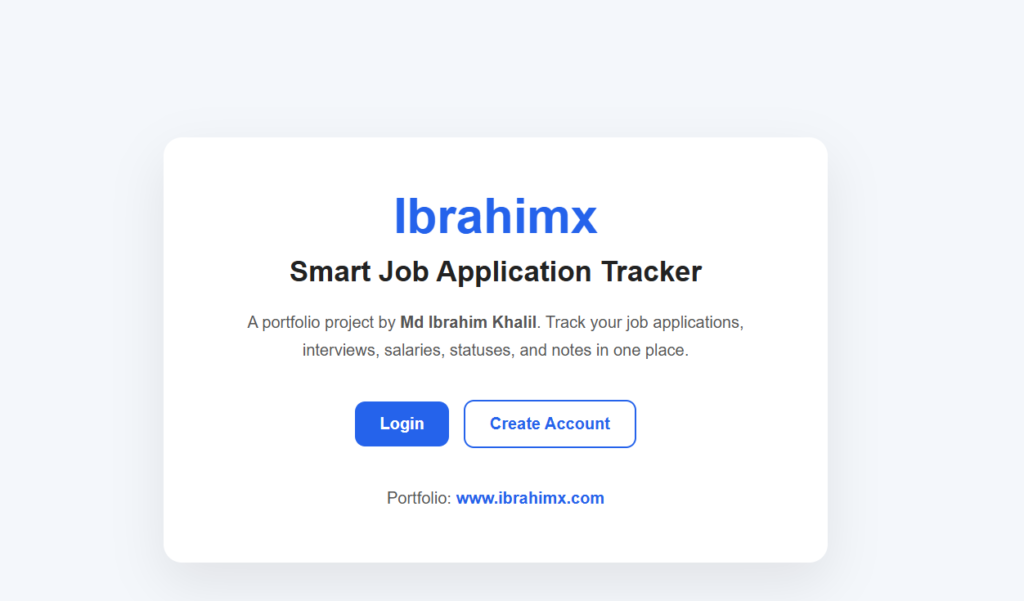
The homepage is the first page users see when they open the project.
It introduces the project with the brand name Ibrahimx and explains what the application does.
The homepage includes two main buttons:
- Login
- Create Account
If the user is already logged in, the system redirects them directly to the dashboard.
This gives the project a professional user flow.
2. Register Page
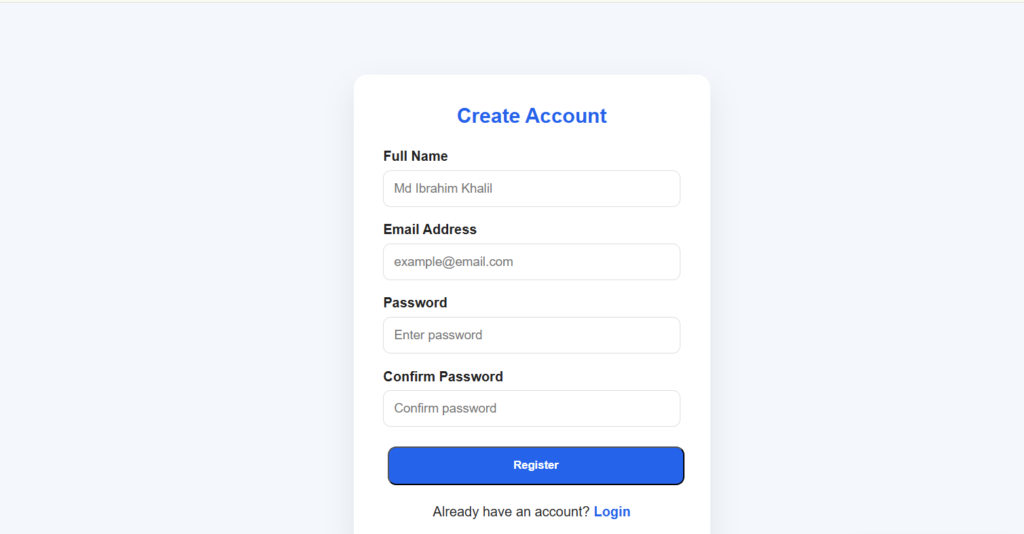
The register page allows a new user to create an account.
The user enters:
- Full name
- Email address
- Password
- Confirm password
The system checks:
- Are all fields filled?
- Is the email valid?
- Do the passwords match?
- Does the email already exist?
If everything is correct, the password is encrypted and saved in the database.
This page teaches students how user registration works in PHP.
3. Login
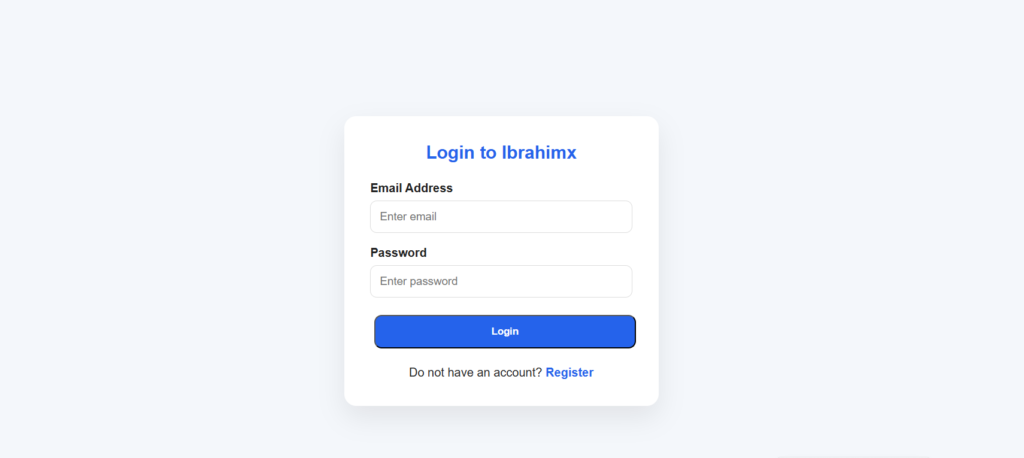
The login page allows registered users to access their dashboard.
The user enters:
- Password
The system checks the email in the database and verifies the password using:
password_verify()If the login details are correct, a session is created.
The user is then redirected to the dashboard.
This page teaches how authentication and sessions work in PHP.
4. Logout Page
The logout page destroys the user session and sends the user back to the login page.
This keeps the application secure.
5. Dashboard Page
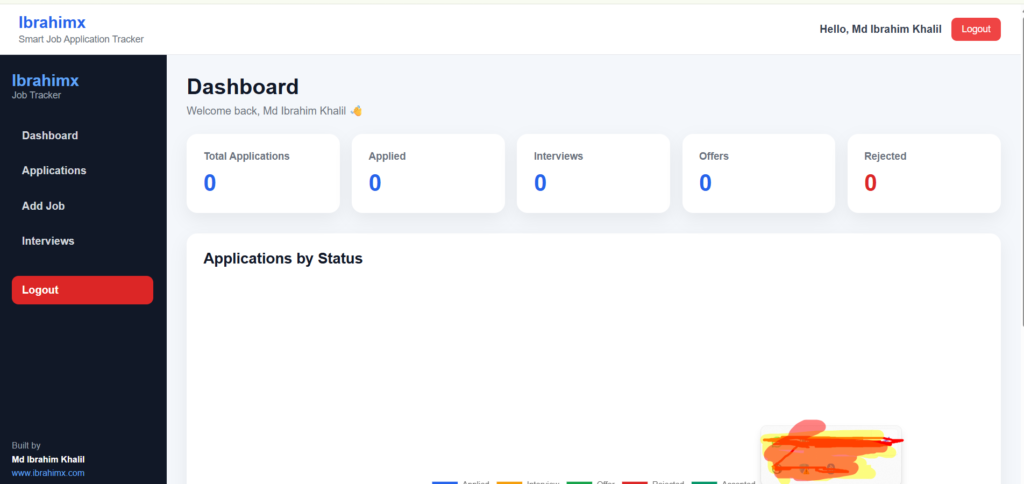
The dashboard is the main page after login.
It gives users a quick overview of their job search progress.
The dashboard shows:
- Total applications
- Applied jobs
- Interview jobs
- Offers
- Rejected applications
- Recent applications
- Upcoming interviews
- Application status chart
This page is useful because users do not need to check every application manually. They can understand their job search status at a glance.
6. Dashboard Statistics
The dashboard uses SQL queries to count applications.
For example:
- Count total jobs
- Count applied jobs
- Count interview jobs
- Count offers
- Count rejected jobs
These numbers are shown in clean statistic cards.
This makes the dashboard look like a real admin panel.
7. Recent Applications Section
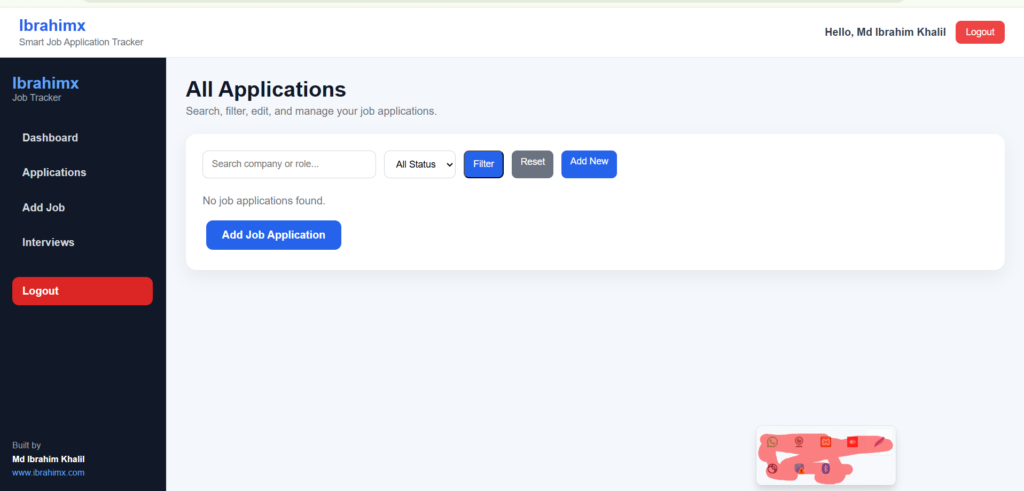
The recent applications section shows the latest job applications added by the user.
It displays:
- Company name
- Job role
- Status
- Application date
This helps the user quickly remember the latest jobs they applied for.
8. Upcoming Interview Reminder
This is one of the most useful features of the project.
The system checks if there are interviews coming within the next few days.
If yes, it displays a reminder on the dashboard.
This feature helps users avoid missing important interviews.
9. Chart.js Application Status Chart
The dashboard includes a visual chart using Chart.js.
The chart shows job applications by status:
- Applied
- Interview
- Offer
- Rejected
- Accepted
This makes the project more interactive and visually attractive.
It also helps students understand how to display database data in charts.
10. Add Job Application Page
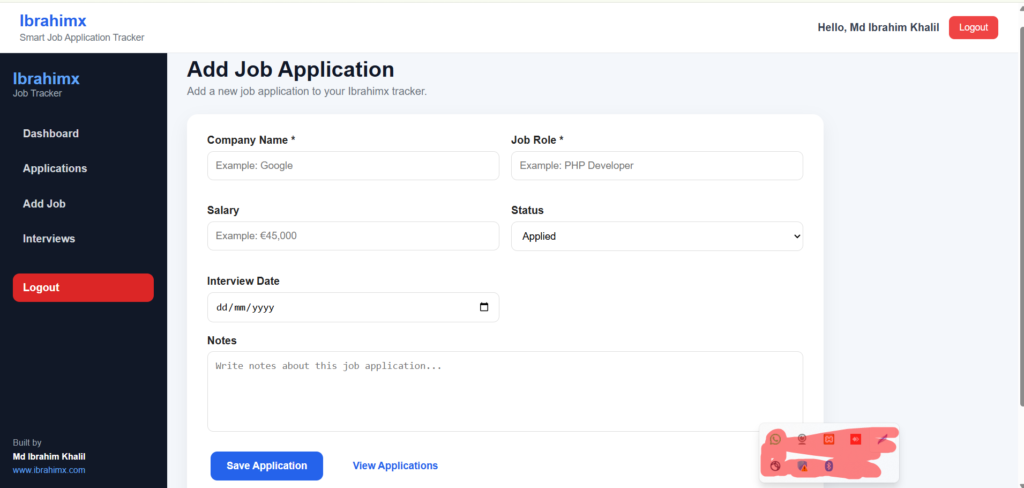
This page allows users to add a new job application.
The form includes:
- Company name
- Job role
- Salary
- Status
- Interview date
- Notes
The company name and role are required fields.
When the user submits the form, the data is saved into the jobs table.
This page demonstrates the Create operation in CRUD.
11. View Applications Page
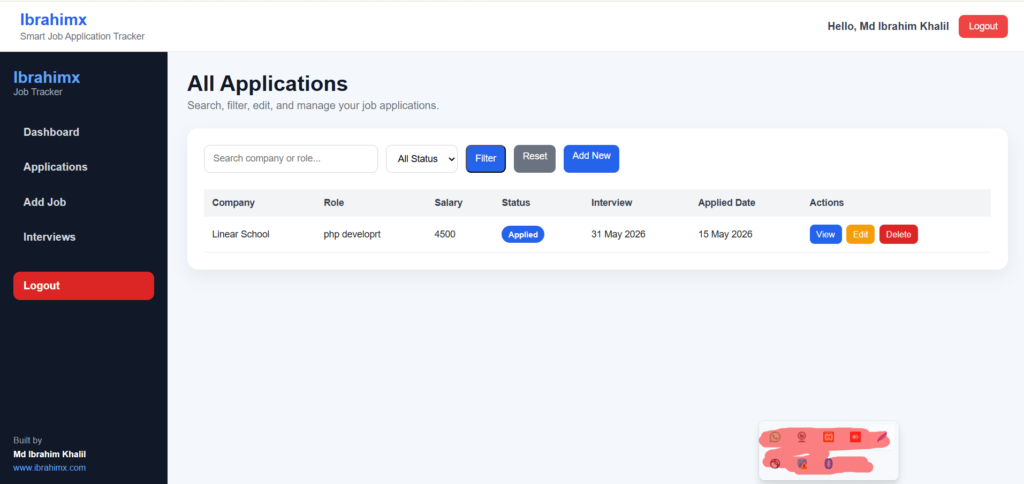
This page displays all job applications in a table.
The table includes:
- Company
- Role
- Salary
- Status
- Interview date
- Applied date
- Actions
Each row has action buttons:
- View
- Edit
- Delete
This page demonstrates the Read operation in CRUD.
12. Search Feature
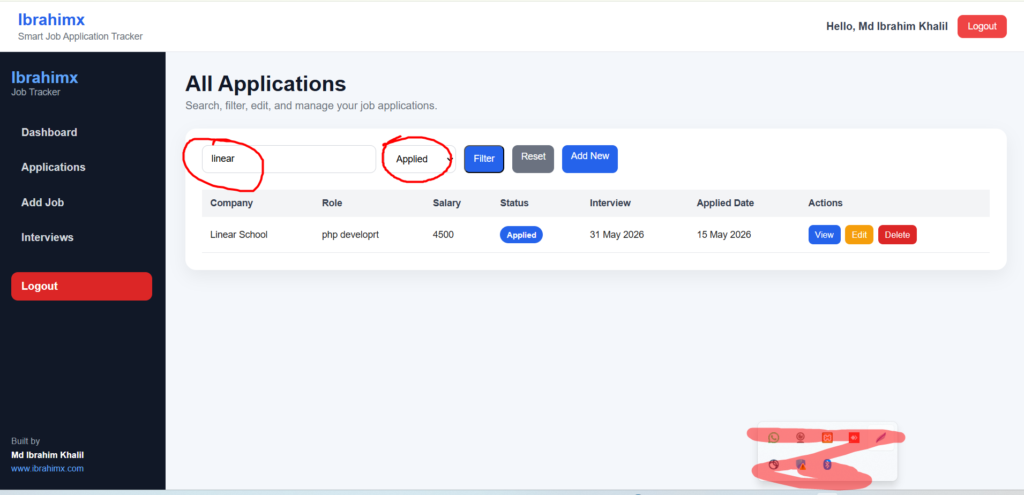
The search feature allows users to search applications by:
- Company name
- Job role
This is useful when the user has many applications and wants to quickly find one.
Example:
If the user searches “Google”, the table will show only Google-related applications.
13. Filter by Status
Available status options:
- Applied
- Interview
- Offer
- Rejected
- Accepted
This helps users focus on a specific group of applications.
For example, they can quickly see all interview-stage applications.
14. Application Details Page
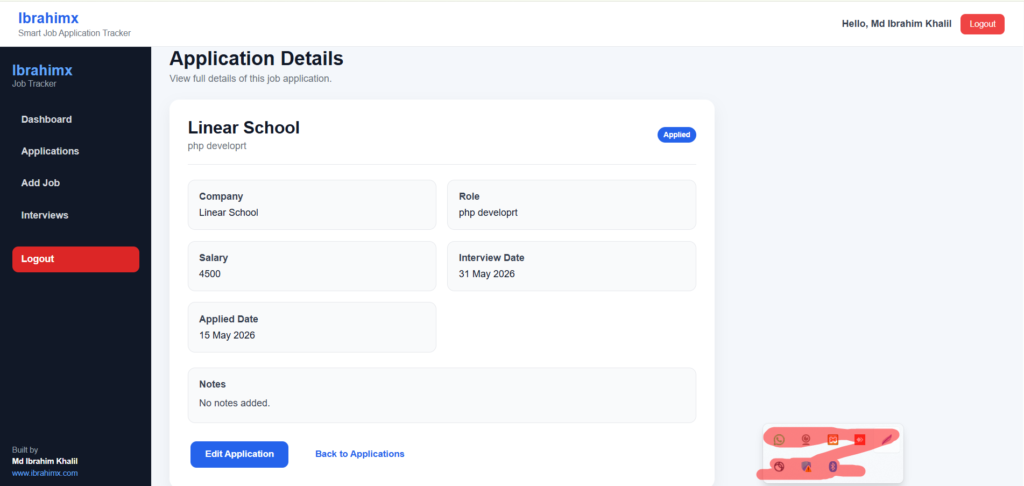
The details page shows full information about a single job application.
It displays:
- Company name
- Job role
- Salary
- Status
- Interview date
- Applied date
- Notes
This page is helpful when users want to read complete information about one application.
15. Edit Job Application Page
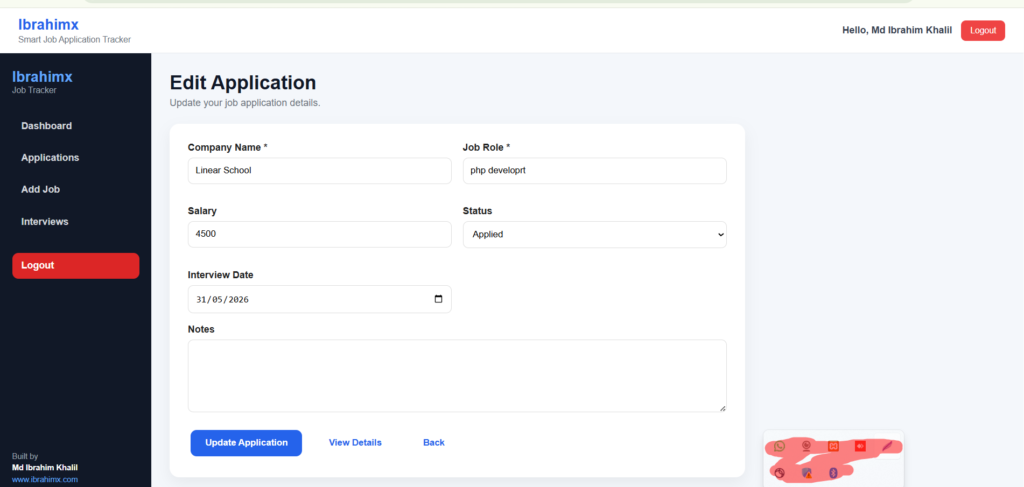
The edit page allows users to update application information.
Users can change:
- Company name
- Role
- Salary
- Status
- Interview date
- Notes
After updating, the data is saved in the database.
This page demonstrates the Update operation in CRUD.
16. Delete Job Application Feature
The delete feature allows users to remove an application.
Before deleting, the browser shows a confirmation message.
This prevents accidental deletion.
This page demonstrates the Delete operation in CRUD.
17. Header Design
The header is reusable across dashboard pages.
It includes:
- Project name
- Short project subtitle
- Logged-in user name
- Logout button
Using a reusable header keeps the code clean.
18. Sidebar Design
The sidebar makes navigation easy.
It includes links to:
- Dashboard
- Applications
- Add Job
- Interviews
- Logout
The sidebar also includes branding:
- Ibrahimx
- Md Ibrahim Khalil
- www.ibrahimx.com
20 Footer Design
The footer displays project credit.
It includes:
- Current year
- Project name
- Developer name
- Portfolio URL
This makes the project look complete and professional.
20. Authentication Protection
This file protects private pages.
If a user tries to access dashboard pages without logging in, the system redirects them to the login page.
This is important for security.
21. Security Features
This project includes basic security features.
Password Hashing
Passwords are not stored as plain text.
They are hashed using:
password_hash()Password Verification
During login, passwords are verified using:
password_verify()Session Protection
Dashboard pages are protected using sessions.
User-Specific Data
Each user can only see their own applications.
This is done using user_id in SQL queries.
What Students Will Learn
This project is useful for students because it covers many real-world concepts.
Students will learn:
- How to connect PHP with MySQL
- How to create a login system
- How to use sessions
- How to insert data
- How to fetch data
- How to update data
- How to delete data
- How to search and filter records
- How to build dashboard statistics
- How to use Chart.js
- How to organize project folders
- How to build reusable PHP components
- How to design a responsive dashboard
Why This Project Is Good for a Portfolio
This project is better than a simple calculator or basic to-do list because it solves a real problem.
Recruiters like projects that show:
- Authentication
- Database design
- CRUD operations
- Dashboard UI
- Search/filter logic
- Data visualization
- Clean folder structure
- Responsive design
This project shows that the developer can build a complete web application from start to finish.
How to Download the Project
You can download the full source code from GitHub.
GitHub Repository
https://github.com/ibrahimkhalil007/Smart-job-trackerYou can clone it using:
git clone https://github.com/ibrahimkhalil007/Smart-job-tracker.gitHow to Run the Project Locally
Follow these steps.
Step 1: Install XAMPP
Install XAMPP on your computer.
Step 2: Start Apache and MySQL
Open XAMPP Control Panel and start:
- Apache
- MySQL
Step 3: Move Project Folder
Move the project folder into:
htdocsUse this folder name:
smart-job-trackerAvoid spaces in the folder name.
Correct:
smart-job-trackerWrong:
Smart job tracker (ibrahimx)Spaces can break CSS file paths.
Step 4: Create Database
Open phpMyAdmin and create:
smart_job_trackerStep 5: Import SQL Tables
Create the users and jobs tables.
Step 6: Update Database Connection
Open:
config/database.phpCheck database name, username, and password.
Step 7: Run the Project
Open browser:
http://localhost/smart-job-tracker/The Ibrahimx Smart Job Application Tracker is a complete PHP and MySQL web application for managing job applications.
It includes user authentication, job CRUD, dashboard statistics, search, filtering, interview reminders, and charts.
This project is perfect for students who want to learn PHP through a real-world example.
It is also a strong portfolio project because it demonstrates backend logic, database handling, UI design, and practical problem-solving.
Final Call to Action
If you are learning PHP and MySQL, this project is a great starting point.
Download the source code from GitHub, run it on localhost, study every file, and customize it with your own features.
Download Source Code
https://github.com/ibrahimkhalil007/Smart-job-tracker
Developer
Md Ibrahim Khalil
Ibrahimx
www.ibrahimx.com